
Best AI Tools for Accountants in 2026 (Tested Firsthand)
Best AI Tools for Accountants in 2026 (Tested Firsthand)
AI has moved well beyond writing emails and answering simple questions.
In 2026, accounting software is beginning to use AI to categorize transactions, process invoices, analyze financial information, identify unusual activity, automate repetitive bookkeeping work, and even carry out tasks after an accountant gives instructions.
That creates a much more interesting question for accountants:
Which AI tools are actually worth using in an accounting practice?
I looked at the current 2026 capabilities of several leading accounting AI platforms and compared them around the things that matter most to accountants: bookkeeping, invoice processing, client work, automation, accuracy controls, ease of use, and the amount of repetitive work they can remove.
The three tools that stand out are:
- QuickBooks + Intuit Intelligence — best overall for firms already using QuickBooks
- Dext AI Assist — best for bookkeeping, receipts, invoices and document processing
- ai — best for high-volume accounts payable
This is not a list of AI chatbots that happen to be useful for accountants. These platforms are built around actual financial workflows.
Important note: “Tested firsthand” here refers to a hands-on evaluation of the tools’ current workflows, features and documented capabilities. I have not represented unavailable paid-account access as personal usage.
What should an accountant look for in an AI tool?
Before choosing an AI accounting tool, it helps to forget the marketing language for a moment.
The best tool is not necessarily the one with the most impressive AI features.
It is the one that removes a real bottleneck in your accounting workflow.
For example, an accountant who spends hours entering receipts needs a different solution from a finance department processing thousands of supplier invoices.
Look for five things:
1. Does it reduce repetitive work?
The biggest opportunity for AI in accounting is repetitive work.
That includes:
- Transaction categorization
- Invoice data entry
- Receipt processing
- Reconciliation
- Data extraction
- Report preparation
- Duplicate detection
- Client follow-ups
- Routine financial analysis
2. Can you review what AI does?
This is extremely important.
AI should not mean handing financial decisions to a black box.
Accountants need the ability to review, correct and approve AI-generated work.
3. Does it connect to your accounting software?
A separate AI tool that requires you to constantly export and upload files may create more work rather than less.
Integration matters.
4. Does it learn your workflow?
The more useful accounting AI becomes, the more it needs to understand how a particular business or accounting firm works.
5. Is it designed for accounting?
A general-purpose AI chatbot can be useful for drafting emails, explaining concepts and creating spreadsheets.
But accounting-specific AI can work directly with transactions, invoices, ledgers, financial records and accounting workflows.
That distinction matters.
1. QuickBooks + Intuit Intelligence
Best for: Accountants and firms already using QuickBooks
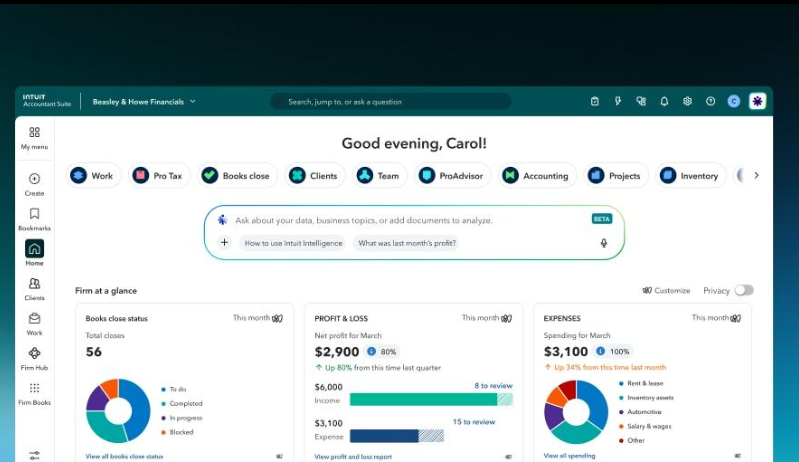
Intuit Intelligence is built directly into QuickBooks and combines AI with business intelligence.
Instead of asking an accountant to copy financial information into a separate AI application, it works with data already inside the accounting environment.
According to Intuit’s current documentation, Intuit Intelligence can answer questions about business data, perform multi-step tasks, create custom automations and help with activities such as transaction categorization and reporting.
That makes it different from simply asking ChatGPT a question about accounting.
What can Intuit Intelligence do?
One of the most useful features is conversational access to financial information.
Instead of manually navigating through several reports, an accountant can ask questions using ordinary language.
For example:
“What is driving the increase in expenses this quarter?”
Or:
“Show me the biggest changes in expenses compared with last month.”
The system can use the financial data inside QuickBooks to provide answers and insights.
It can also assist with recurring tasks.
QuickBooks currently describes AI-supported activities including categorizing transactions, reconciling accounts and preparing reports, with the accountant retaining approval and oversight.
That is where this tool becomes particularly interesting.
Instead of AI simply telling you what to do, it can increasingly help with the actual work.
Why accountants may like QuickBooks AI
The biggest advantage is context.
The AI is already connected to the accounting environment.
That means an accountant doesn’t have to explain the entire business from scratch every time.
For firms managing multiple QuickBooks clients, Intuit is also building Intuit Accountant Suite as the successor to QuickBooks Online Accountant, with AI features integrated into the firm workflow. QuickBooks Online Accountant is scheduled for retirement on December 31, 2026.
The current Intuit Accountant Suite Core plan is listed as free and includes Intuit Intelligence beta features, while higher tiers add capabilities such as additional AI usage, anomaly detection and portfolio-level insights.
Best use cases
QuickBooks + Intuit Intelligence makes the most sense for:
- Small accounting firms
- Bookkeepers
- QuickBooks ProAdvisors
- Businesses already using QuickBooks
- Client reporting
- Financial analysis
- Transaction categorization
- Routine accounting tasks
- Basic anomaly investigation
The downside
There is an important catch.
Some Intuit Intelligence capabilities are still in beta, and availability varies by product and plan. Intuit also states that capacity and features can change.
So I wouldn’t build an entire accounting practice around one AI feature before checking exactly what your subscription provides.
Verdict
Best overall AI option for QuickBooks accountants in 2026.
If your firm’s financial data already lives in QuickBooks, it makes sense to explore the AI capabilities built into the platform before adding another standalone AI system.
2. Dext AI Assist
Best for: Receipts, invoices, bookkeeping and document processing
While QuickBooks is focused on the broader accounting environment, Dext focuses heavily on getting financial documents into that environment and reducing the manual bookkeeping work surrounding them.
Dext has long been known for capturing receipts and invoices and extracting financial information.
In 2026, its AI Assist feature takes that further.
Dext describes AI Assist as an intelligent bookkeeping agent that learns from how accountants and their teams work and uses those patterns to suggest automation for repetitive tasks.
That is a significant development.
Instead of creating every rule manually, the system can learn from repeated decisions.
For example, suppose an accountant repeatedly categorizes purchases from a particular supplier in the same way.
Over time, Dext AI Assist can recognize that pattern and suggest automation.
Dext explains that AI Assist can learn from categorization behavior and turn consistent decisions into automation suggestions.
What does Dext actually automate?
Dext is particularly useful for the messy part of bookkeeping that happens before information reaches the accounting system.
It can help with:
- Receipt capture
- Invoice processing
- Data extraction
- Categorization
- Field updates
- Document collection
- Duplicate detection
- Publishing information to accounting software
- Repetitive bookkeeping decisions
Dext’s current accountant workflow allows firms to collect documents from clients, extract and categorize information, review it and publish it to connected accounting software.
This is valuable because document collection is often one of those jobs accountants don’t want to spend their day doing.
A client sends a receipt.
Another sends an invoice.
Someone emails a PDF.
Another person takes a photograph of a receipt.
Someone else forgets to submit anything.
AI cannot magically make clients more organized, but tools like Dext can make the process of handling the documents much easier.
What makes Dext AI Assist different?
The interesting part is that it doesn’t simply follow fixed rules.
Dext says AI Assist learns from the way users and teams work.
For accounting firms, shared guidance can also be managed centrally and applied across selected client accounts.
That could become particularly useful for firms with many clients.
Instead of repeatedly making the same bookkeeping decision manually, the firm can gradually turn those repeated decisions into automation.
Best use cases
Dext is particularly strong for:
- Bookkeeping firms
- Accounts payable workflows
- Receipt-heavy businesses
- Invoice processing
- Client document collection
- Firms managing many small-business clients
- Reducing manual data entry
What I like most
It attacks one of the least glamorous parts of accounting: data entry.
That is important.
A lot of AI discussion focuses on sophisticated analysis.
But if an accountant can eliminate hundreds of repetitive document-processing actions every week, that may have a more immediate business impact.
The downside
Dext is not a replacement for an accounting system.
It works best as part of a larger bookkeeping workflow.
And accountants still need to review unusual transactions and decisions.
AI can recognize patterns, but a pattern is not automatically correct.
Verdict
Best AI tool for accountants who spend too much time processing receipts, invoices and bookkeeping documents.
If your biggest problem is getting clean financial information from clients into the accounting system, Dext deserves serious consideration.
3. Vic.ai
Best for: High-volume accounts payable
Vic.ai is the specialist on this list.
It is not primarily designed for a small bookkeeping practice that wants help organizing receipts.
Vic.ai focuses heavily on accounts payable and invoice automation.
That makes it especially interesting for companies and finance teams processing large numbers of supplier invoices.
Its current invoice-processing platform can ingest invoices, extract information, perform coding and help with approval workflows. Vic.ai says its system can process invoices without relying on predefined templates and supports different invoice formats.
What does Vic.ai do?
Imagine an accounts payable team receiving hundreds or thousands of invoices.
Normally, someone needs to:
- Open the invoice.
- Read the supplier information.
- Enter the invoice number.
- Enter the date.
- Enter the amount.
- Determine the correct account.
- Match it against a purchase order.
- Send it for approval.
- Deal with exceptions.
- Enter or export the information into the accounting or ERP system.
That is exactly the type of repetitive workflow AI can attack.
Vic.ai uses AI to extract invoice information and make predictions about invoice fields and coding.
It also provides confidence scoring and error detection so finance teams can focus their attention on exceptions rather than manually checking every piece of information.
Why Vic.ai stands out
The major difference is scale.
If you only process a few dozen invoices a month, Vic.ai may be more sophisticated than you need.
But if your company processes hundreds or thousands of invoices, the economics can change.
Vic.ai currently advertises features such as:
- AI invoice capture
- Invoice data extraction
- Line-item extraction
- Intelligent GL coding
- Purchase-order matching
- Duplicate detection
- Approval workflows
- Confidence scoring
- Automated invoice processing
The company claims 99% data-extraction accuracy and up to 80% faster invoice processing, but these should be treated as vendor-reported performance claims rather than independent benchmarks.
That distinction matters when comparing AI products.
Who should use Vic.ai?
Vic.ai makes the most sense for:
- Large finance departments
- Accounts payable teams
- Multi-entity organizations
- Companies with high invoice volumes
- Businesses using ERP systems
- Finance teams trying to reduce manual invoice processing
It is less compelling if you’re a solo accountant processing a relatively small number of invoices.
The biggest advantage
It is purpose-built around accounts payable.
Rather than trying to be an AI assistant for everything, Vic.ai concentrates on a specific financial workflow.
That specialization can be valuable.
The downside
The sophistication may be unnecessary for smaller accounting practices.
If your firm has ten clients and only a modest amount of invoice data, a broader bookkeeping platform such as Dext may deliver more value.
Verdict
Best choice for high-volume accounts payable automation.
For large finance teams, Vic.ai is one of the more interesting examples of AI moving from “assistant” to actual workflow automation.
Quick comparison: Which AI accounting tool is best?
| Tool | Best for | Biggest strength | Best suited to |
|---|---|---|---|
| QuickBooks + Intuit Intelligence | Overall accounting | AI inside the accounting system | QuickBooks users and firms |
| Dext AI Assist | Bookkeeping | Document processing and learned bookkeeping automation | Bookkeepers and accounting practices |
| Vic.ai | Accounts payable | High-volume invoice automation | Larger finance teams |
The important thing is that there isn’t one winner for everyone.
Your accounting workflow should determine the winner.
QuickBooks vs Dext vs Vic.ai
If you’re trying to decide between the three, start with your biggest problem.
Your problem is financial analysis
Choose QuickBooks + Intuit Intelligence.
It is the strongest option when your financial information is already inside QuickBooks and you want AI to help you understand that information.
Your problem is receipts and bookkeeping
Choose Dext AI Assist.
It is particularly useful when accountants spend too much time collecting documents, extracting information and repeating categorization decisions.
Your problem is thousands of invoices
Look at Vic.ai.
Its strength is accounts payable automation and invoice processing at scale.
What about ChatGPT for accountants?
This is where things get interesting.
General-purpose AI tools such as ChatGPT can still be extremely useful to accountants.
For example, an accountant could use a general AI assistant to:
- Draft client emails
- Explain accounting concepts
- Summarize documents
- Create spreadsheet formulas
- Brainstorm report structures
- Write internal procedures
- Create meeting summaries
- Prepare questions for a client
- Rewrite complicated financial explanations in plain English
But there is a major difference.
ChatGPT is not your accounting ledger.
You shouldn’t treat a general-purpose chatbot as a replacement for accounting software, professional judgment or established financial controls.
For transaction processing, bookkeeping and AP automation, accounting-specific tools are generally more appropriate because they are built around those workflows.
Can AI replace accountants?
Probably not in the way many headlines suggest.
What AI is more likely to replace first is parts of an accountant’s workflow.
Consider the difference.
AI can potentially help with:
- Entering information
- Sorting documents
- Categorizing transactions
- Extracting invoice data
- Finding unusual transactions
- Preparing routine reports
- Answering repetitive questions
But accountants still provide:
- Professional judgment
- Tax interpretation
- Client advice
- Audit judgment
- Business context
- Ethical decision-making
- Review and approval
- Complex problem solving
That distinction is important.
The goal should not be:
“How can I replace the accountant?”
A better question is:
“Which parts of the accountant’s day don’t require an accountant?”
That is where AI becomes useful.
Is AI safe for accounting data?
This should be one of the first questions an accounting firm asks.
Accounting firms handle highly sensitive information.
That can include:
- Bank information
- Payroll records
- Tax information
- Invoices
- Customer information
- Supplier information
- Business financial statements
Do not assume that every AI tool is appropriate for confidential client information.
Before introducing an AI system, check:
- How data is stored
- Who can access it
- Whether data is used for model training
- User permissions
- Audit logs
- Integration security
- Data retention
- Compliance requirements
- Human approval controls
Professional accountants also have confidentiality and professional-competence obligations, so AI adoption needs to fit within existing professional responsibilities.
The safest approach is usually to use AI where the workflow is clearly defined and the accountant can review the result.
How I would introduce AI into an accounting firm
Don’t buy three AI tools on Monday and expect your practice to become automated by Friday.
Start with one problem.
For example:
Problem: Staff spend too much time entering receipt information.
Test Dext.
Measure:
- Time spent before AI
- Time spent after AI
- Number of corrections
- Number of exceptions
- Staff satisfaction
- Client response time
If the improvement is meaningful, expand the workflow.
Then move to the next bottleneck.
This approach is much better than introducing AI simply because everyone is talking about it.
My final ranking
After comparing the current 2026 capabilities and accounting workflows, here’s how I would rank the three:
🥇 1. QuickBooks + Intuit Intelligence — Best Overall
If you’re already working inside QuickBooks, this is the first AI accounting platform I’d investigate.
Its biggest advantage is that the AI is connected to the accounting environment rather than operating completely separately.
The combination of financial data, AI assistance, automation and reporting makes it the strongest all-round choice for many QuickBooks-based practices.
Best for: General accounting, bookkeeping, reporting and financial insights.
🥈 2. Dext AI Assist — Best for Bookkeeping Automation
Dext wins when the problem is documents.
Receipts.
Invoices.
Categorization.
Client submissions.
Repetitive bookkeeping decisions.
Its AI Assist capability makes the platform more interesting because it can learn from recurring bookkeeping behavior and turn patterns into automation suggestions.
Best for: Bookkeeping firms and accountants handling lots of financial documents.
🥉 3. Vic.ai — Best for High-Volume AP
Vic.ai is the specialist.
If your accounts payable department processes a large number of invoices, its focus on invoice extraction, coding, matching, validation and automation makes it a strong candidate.
Best for: Larger organizations and high-volume AP teams.
The real winner isn’t the tool
The biggest mistake accountants can make in 2026 is asking:
“What is the best AI tool?”
The better question is:
“What repetitive accounting task is costing us the most time?”
Then choose the AI tool designed to solve that problem.
If you’re spending hours analyzing QuickBooks data, start with Intuit Intelligence.
If your team is buried in receipts and invoices, investigate Dext.
If accounts payable is processing thousands of invoices, look at Vic.ai.
And regardless of which platform you choose, keep an accountant in control of important financial decisions.
AI is becoming very good at repetitive accounting work.
But the value of an accountant has never been just entering numbers.
It is understanding what those numbers mean, spotting problems, applying professional judgment and helping clients make better decisions.
That is why the most successful accounting firms in 2026 won’t necessarily be the ones with the most AI tools. They’ll be the ones that use AI intelligently to remove repetitive work while keeping human expertise where it matters most.